Your SDLC,
on autopilot
Fabrik watches your GitHub Project board and drives Claude Code through a full software development pipeline — Specify, Research, Plan, Implement, Review, Validate — automatically. File an issue. Drag a card. Ship.
How It Works
Issues in. Code out.
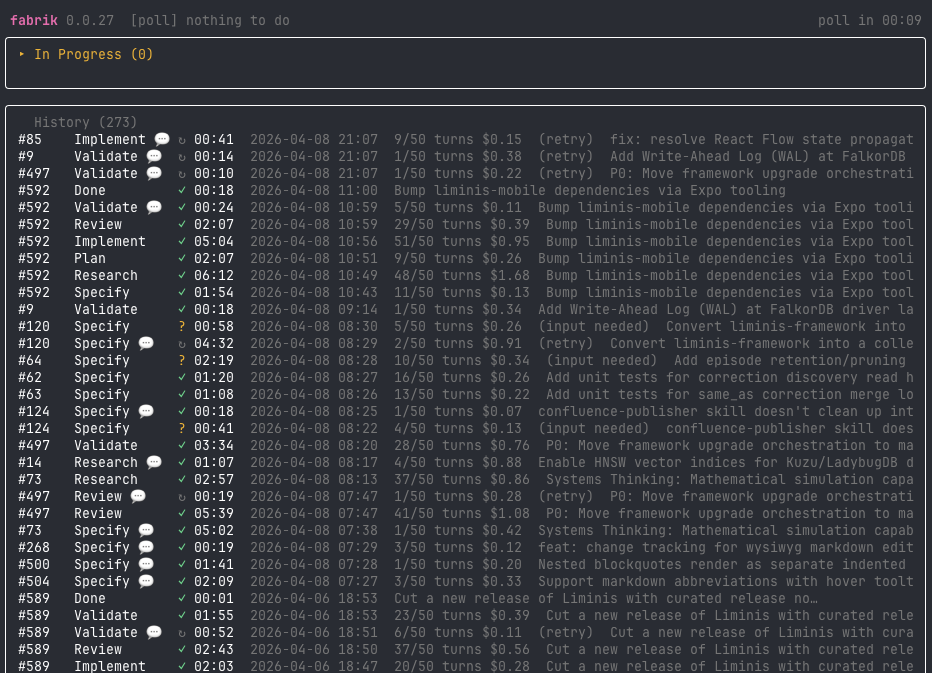
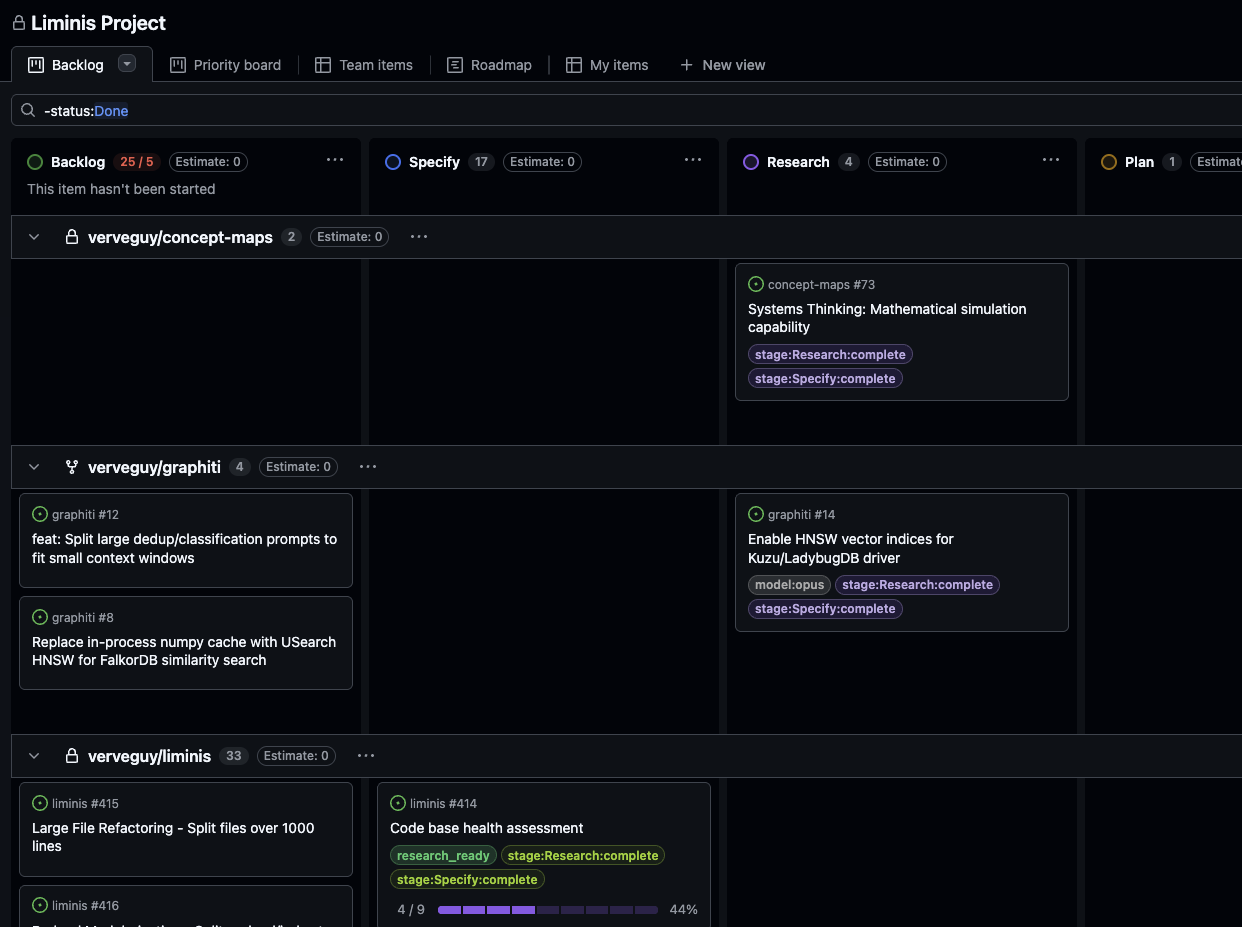
Each issue moves through board columns that map to pipeline stages. Fabrik polls the board, matches the issue's column to a stage config, spins up an isolated git worktree, and invokes Claude Code with the stage's prompt.
Features
Everything you need to automate your SDLC
Fabrik gives Claude Code the structure, context, and tooling to work reliably through a full software lifecycle — with you in the loop at every step.
.fabrik/worktrees/<owner>-<repo>/issue-N/
on branch fabrik/issue-N. Multiple issues run in parallel,
zero cross-contamination.
FABRIK_BLOCKED_ON_INPUT —
the issue pauses and automatically resumes the moment you reply.
--yolo and Fabrik auto-advances issues through
every stage without human approval — and auto-merges the PR when
Validate completes. Apply the fabrik:yolo label to a
single issue to get the same behavior scoped to just that issue.
fabrik:locked:<user> labels prevent conflicts.
Stage work is scoped to each instance's --user;
comment processing handles comments from any author.
--auto-upgrade and Fabrik watches origin/main.
When idle and new commits appear, it rebuilds itself and re-execs —
no manual deploys.
l to open fabrik watch for the selected issue
(live log streaming, stage tabs, CI/PR status), enter to
toggle an inline detail panel, r to resume a Claude session
from history, and q to quit. Mouse support enabled by default.
repo: in .fabrik/config.yaml — Fabrik
then processes issues from all repositories on the board.
.fabrik/plugin/skills/. Reference a skill by name in your
stage YAML — Fabrik injects it into Claude's prompt. Default skills
ship with Fabrik; fabrik init installs them and
fabrik upgrade refreshes them.
fabrik:blocked label is managed
entirely by the engine — no pre-creation needed. See the
USER_GUIDE §3
for the full recipe and real-world validation numbers.
wait_for_reviews: true on a stage and Fabrik waits
for all requested PR reviewers to submit before auto-advancing.
Controlled by FABRIK_REVIEW_WAIT_TIMEOUT (default 15 min).
The fabrik:awaiting-review label makes the wait state
visible on the board; the gate clears automatically when all reviews
are in or the timeout elapses.
fabrik watch, Fabrik researched its own log
format, designed the per-issue monitoring command, and implemented the live log
streaming and CI check UI — building the observatory it now uses to watch itself
build features. This page was written by Fabrik too.
The human's role is product manager: file issues, answer clarifying questions, drag cards, and occasionally comment to redirect the work. The factory does the rest.
Quickstart
From zero to pipeline in minutes
Fabrik runs as a local CLI. You need Claude Code, a GitHub token, and either gh CLI or Go.
gh CLI with gh auth login (repo access required). For source build: Go 1.26.1+. Both paths need Claude Code CLI and a GitHub token with repo and project scopes.gh, or clone and build from source. Then run fabrik init to scaffold stage configs into your project..fabrik/config.yaml with your project settings, add your token to .env, and run ./fabrik.# Option A: Install binary (requires gh) # Requires: gh auth login with access to shadoworg/fabrik # Extracts to current directory — cd to ~/bin first, or move binary afterwards cd ~/bin gh release download --repo shadoworg/fabrik \ --pattern "fabrik_*_$(uname -s | tr A-Z a-z)_$(uname -m | sed 's/x86_64/amd64/' | sed 's/aarch64/arm64/').tar.gz" \ -O - | tar xz # Platform-specific alternatives: # darwin/arm64: --pattern "fabrik_*_darwin_arm64.tar.gz" # darwin/amd64: --pattern "fabrik_*_darwin_amd64.tar.gz" # linux/amd64: --pattern "fabrik_*_linux_amd64.tar.gz" # linux/arm64: --pattern "fabrik_*_linux_arm64.tar.gz" # Option B: Build from source (requires Go) git clone https://github.com/shadoworg/fabrik cd fabrik go build -o fabrik . # 2. Initialize your project (pass your GitHub Project URL to skip manual config) ./fabrik init --user you https://github.com/orgs/your-org/projects/5 # Creates .fabrik/stages/, .fabrik/config.yaml # URL auto-populates owner, project, and owner_type; --user sets your username # Without a URL: prompts interactively (TTY) or writes a blank template (non-TTY) # 3. Add your GitHub token echo 'FABRIK_TOKEN=ghp_...' >> .env echo '.env' >> .gitignore # 4. Run ./fabrik # Optional: yolo mode (auto-advance all stages) ./fabrik --yolo # Optional: self-upgrade from origin/main when idle ./fabrik --auto-upgrade